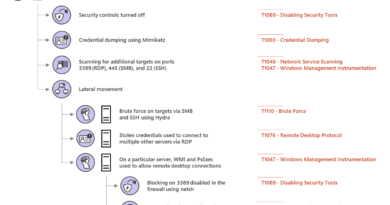

Storm-1175 focuses gaze on vulnerable web-facing assets in high-tempo Medusa ransomware operations
The financially motivated cybercriminal actor tracked by Microsoft Threat Intelligence as Storm-1175 operates high-velocity ransomware campaigns that weaponize N-days, targeting vulnerable, web-facing systems during the window between vulnerability disclosure and widespread patch adoption. Following successful exploitation, Storm-1175 rapidly moves from initial access to data exfiltration and deployment of Medusa ransomware, often within a few days and, in some cases, within 24 hours. The threat actor’s high operational tempo and proficiency in identifying exposed perimeter assets have proven successful, with recent intrusions heavily impacting healthcare organizations, as well as those in the education, professional services, and finance sectors in Australia, United Kingdom, and United States.
The pace of Storm-1175’s campaigns is enabled by the threat actor’s consistent use of recently disclosed vulnerabilities to obtain initial access. While the threat actor typically uses N-day vulnerabilities, we have also observed Storm-1175 leveraging zero-day exploits, in some cases a full week before public vulnerability disclosure. The threat actor has also been observed chaining together multiple exploits to enable post-compromise activity. After initial access, Storm-1175 establishes persistence by creating new user accounts, deploys various tools including remote monitoring and management software for lateral movement, conducts credential theft, and tampers with security solutions before deploying ransomware throughout the compromised environment.
In this blog post, we delve into the attack techniques attributed to Storm-1175 over several years. While Storm-1175’s methodology aligns with the tactics, techniques, and procedures (TTPs) of many tracked ransomware actors, analysis of their post-compromise tactics provides essential insights into how organizations can harden and defend against attackers like Storm-1175, informing opportunities to disrupt attackers even if they have gained initial access to a network.
Storm-1175’s rapid attack chain: From initial access to impact
Exploitation of vulnerable web-facing assets
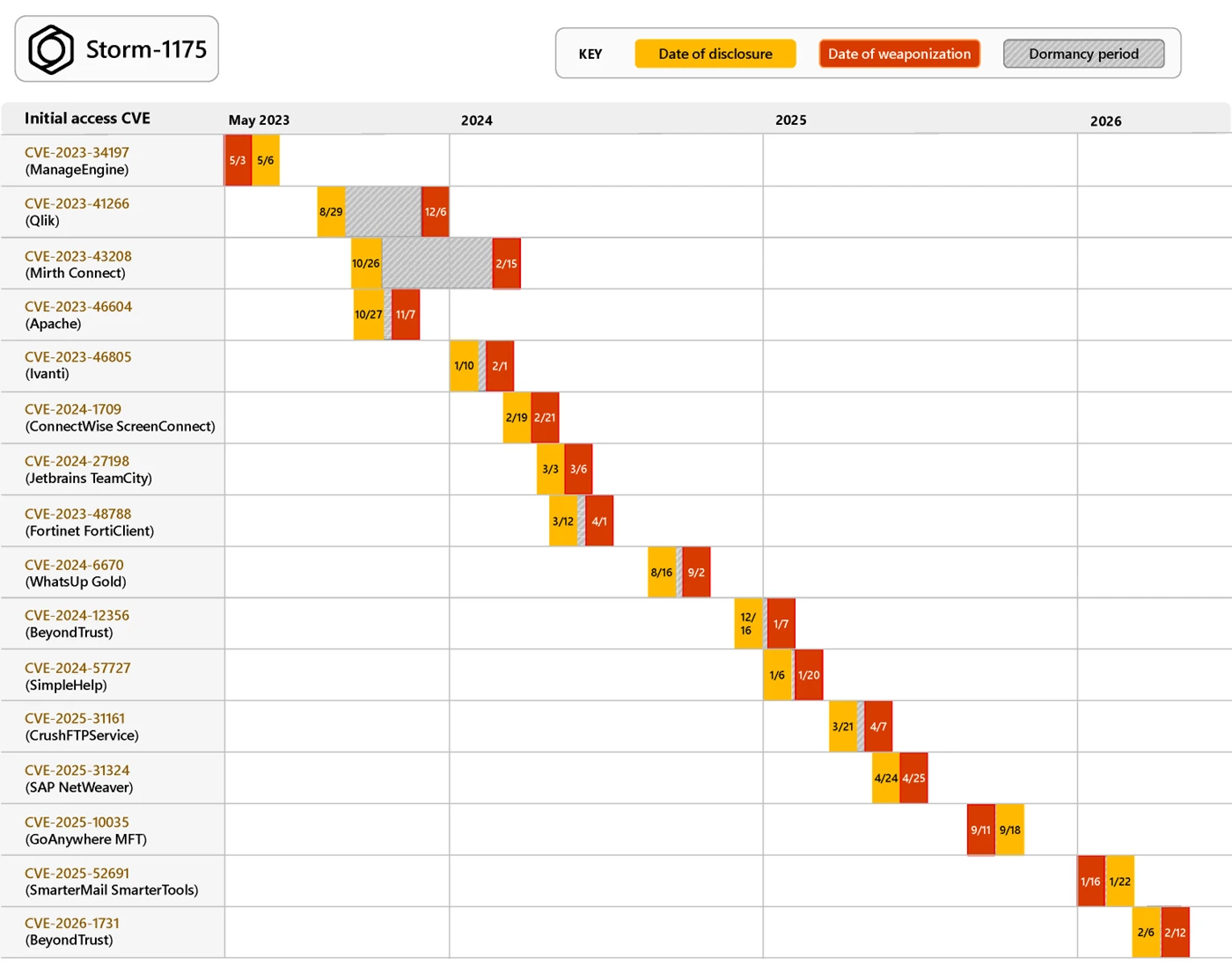
Storm-1175 rapidly weaponizes recently disclosed vulnerabilities to obtain initial access. Since 2023, Microsoft Threat Intelligence has observed exploitation of over 16 vulnerabilities, including:
Storm-1175 rotates exploits quickly during the time between disclosure and patch availability or adoption, taking advantage of the period where many organizations remain unprotected. In some cases, Storm-1175 has weaponized exploits for disclosed vulnerabilities in as little as one day, as was the case for CVE-2025-31324 impacting SAP NetWeaver: the security issue was disclosed on April 24, 2025, and we observed Storm-1175 exploitation soon after on April 25.
In multiple intrusions, Storm-1175 has chained together exploits to enable post-compromise activities like remote code execution (RCE). For example, in July 2023, Storm-1175 exploited two vulnerabilities affecting on-premises Microsoft Exchange Servers, dubbed “OWASSRF” by public researchers: exploitation of CVE‑2022‑41080 provided initial access by exposing Exchange PowerShell via Outlook Web Access (OWA), and Storm-1175 subsequently exploited CVE‑2022‑41082 to achieve remote code execution.
Storm-1175 has also demonstrated a capability for targeting Linux systems as well: in late 2024, Microsoft Threat Intelligence identified the exploitation of vulnerable Oracle WebLogic instances across multiple organizations, though we were unable to identify the exact vulnerability being exploited in these attacks.
Finally, we have also observed the use of at least three zero-day vulnerabilities including, most recently, CVE-2026-23760 in SmarterMail, which was exploited by Storm-1175 the week prior to public disclosure, and CVE-2025-10035 in GoAnywhere Managed File Transfer, also exploited one week before public disclosure. While these more recent attacks demonstrate an evolved development capability or new access to resources like exploit brokers for Storm-1175, it is worth noting that GoAnywhere MFT has previously been targeted by ransomware attackers, and that the SmarterMail vulnerability was reportedly similar to a previously disclosed flaw; these factors may have helped to facilitate subsequent zero-day exploitation activity by Storm-1175, who still primarily leverages N-day vulnerabilities. Regardless, as attackers increasingly become more adept at identifying new vulnerabilities, understanding your digital footprint—such as through the use of public scanning interfaces like Microsoft Defender External Attack Surface Management—is essential to defending against perimeter network attacks.
Covert persistence and lateral movement
During exploitation, Storm-1175 typically creates a web shell or drops a remote access payload to establish their initial hold in the environment. From this point, Microsoft Threat Intelligence has observed Storm-1175 moving from initial access to ransomware deployment in as little as one day, though many of the actor’s attacks have occurred over a period of five to six days.
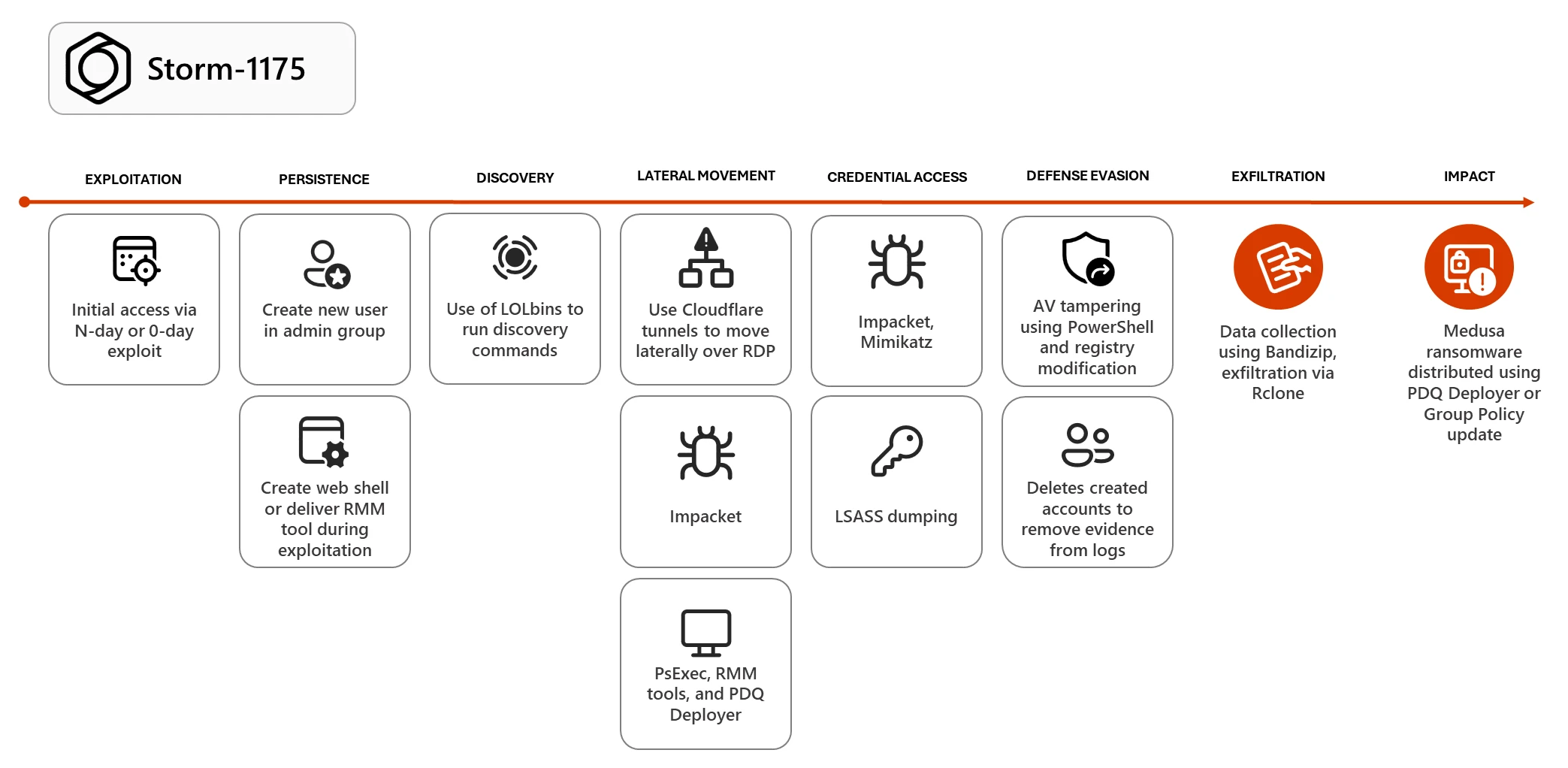
On the initially compromised device, the threat actor often establishes persistence by creating a new user and adding that user to the administrators group:

From this account, Storm-1175 begins their reconnaissance and lateral movement activity. Storm-1175 has a rotation of tools to accomplish these subsequent attack stages. Most commonly, we observe the use of living-off-the-land binaries (LOLBins), including PowerShell and PsExec, followed by the use of Cloudflare tunnels (renamed to mimic legitimate binaries like conhost.exe) to move laterally over Remote Desktop Protocol (RDP) and deliver payloads to new devices. If RDP is not allowed in the environment, Storm-1175 has been observed using administrator privileges to modify the Windows Firewall policy to enable Remote Desktop.

Storm-1175 has also demonstrated a heavy reliance on remote monitoring and management (RMM) tools during post-compromise activity. Since 2023, Storm-1175 has used multiple RMMs, including:
- Atera RMM
- Level RMM
- N-able
- DWAgent
- MeshAgent
- ConnectWise ScreenConnect
- AnyDesk
- SimpleHelp
While often used by enterprise IT teams, these RMM tools have multi-pronged functionality that could also allow adversaries to maintain persistence in a compromised network, create new user accounts, enable an alternative command-and-control (C2) method, deliver additional payloads, or use as an interactive remote desktop session.
In many attacks, Storm-1175 relies on PDQ Deployer, a legitimate software deployment tool that lets system administrators silently install applications, for both lateral movement and payload delivery, including ransomware deployment throughout the network.
Additionally, Storm-1175 has leveraged Impacket for lateral movement. Impacket is a collection of open-source Python classes designed for working with network protocols, and it is popular with adversaries due to ease of use and wide range of capabilities. Microsoft Defender for Endpoint has a dedicated attack surface reduction rule to defend against lateral movement techniques used by Impacket: Block process creations originating from PSExec and WMI commands); protecting lateral movement pathways can also mitigate Impacket.
Credential theft
Impacket is further used to facilitate credential dumping through LSASS; the threat actor also leveraged the commodity credential theft tool Mimikatz in identified intrusions in 2025. Additionally, Storm-1175 has relied on known living-off-the-land techniques for stealing credentials, such as by modifying the registry entry UseLogonCredential to turn on WDigest credential caching, or using Task Manager to dump LSASS credentials; for both of these attack techniques, the threat actor must obtain local administrative privileges to modify these resources. The attack surface reduction rule block credential stealing from LSASS can limit the effectiveness of this type of attack, and—more broadly—limiting the use of local administrator rights by end users. Ensuring that local administrator passwords are not shared through the environment can also reduce the risk of these LSASS dumping techniques.
We have also observed that after gaining administrator credentials, Storm-1175 has used a script to recover passwords from Veeam backup software, which is used to connect to remote hosts, therefore enabling ransomware deployment to additional connected systems.
With sufficient privileges, Storm-1175 can then use tools like PsExec to pivot to a Domain Controller, where they have accessed the NTDS.dit dump, a copy of the Active Directory database which contains user data and passwords that can be cracked offline. This privileged position has also granted Storm-1175 access to the security account manager (SAM), which provides detailed configuration and security settings, enabling an attacker to understand and manipulate the system environment on a much wider scale.
Security tampering for ransomware delivery
Storm-1175 modifies the Microsoft Defender Antivirus settings stored in the registry to tamper with the antivirus software and prevent it from blocking ransomware payloads; in order to accomplish this, an attacker must have access to highly privileged accounts that can modify the registry directly. For this reason, prioritizing alerts related to credential theft activity, which typically indicate an active attacker in the environment, is essential to responding to ransomware signals and preventing attackers from gaining privileged account access.
Storm-1175 has also used encoded PowerShell commands to add the C:\ drive to the antivirus exclusion path, preventing the security solution from scanning the drive and allowing payloads to run without any alerts. Defenders can harden against these tampering techniques by combining tamper protection with the DisableLocalAdminMerge setting, which prevents attackers from using local administrator privileges to set antivirus exclusions.
Data exfiltration and ransomware deployment
Like other ransomware as a service (RaaS) offerings, Medusa offers a leak site to facilitate double extortion operations for its affiliates: attackers not only encrypt data, but steal the data and hold it for ransom, threatening to leak the files publicly if a ransom is not paid. To that aim, Storm-1175 often uses Bandizip to collect files and Rclone for data exfiltration. Data synchronization tools like Rclone allow threat actors to easily transfer large volumes of data to a remote attacker-owned cloud resource. These tools also provide data synchronization capabilities, moving newly created or updated files to cloud resources in real-time to enable continuous exfiltration throughout all stages of the attack without needing attacker interaction.
Finally, having gained sufficient access throughout the network, Storm-1175 frequently leverages PDQ Deployer to launch a script (RunFileCopy.cmd) and deliver Medusa ransomware payloads. In some cases, Storm-1175 has alternatively used highly privileged access to create a Group Policy update to broadly deploy ransomware.
Mitigation and protection guidance
To defend against Storm-1175 TTPs and similar activity, Microsoft recommends the following mitigation measures:
- Use a perimeter scanning tool like Microsoft Defender External Attack Surface Management to understand your organization’s digital footprint and potential attack surface. Targeting web-facing vulnerabilities continues to be one of the most effective attack methods for initial access.
- Ensure any web-facing systems are isolated from the public internet with a secure network boundary and access them with a virtual private network (VPN). If certain servers must be accessible on the public internet, position them behind a web application firewall (WAF), reverse proxy, or perimeter network (also known as a DMZ), which can reduce the risk of vulnerability exploitation in some cases.
- Follow the defending against ransomware guidance in Microsoft’s ransomware as a service blog post, which details how to build credential hygiene as well as how to limit lateral movement using the principle of least privilege.
- Implement Credential Guard, a critical security feature that protects credentials stored in process memory – in the LSA process lsass.exe. Credential Guard is turned on by default in Windows 11. However, if Credential Guard was previously disabled on a device, updating a device to Windows 11 does not override that setting, and Credential Guard will need to be re-enabled. Additionally, Credential Guard should be enabled before a device is joined to a domain or before a domain user signs in for the first time. If Credential Guard is enabled after domain join, the user and device secrets may already be compromised. Credential Guard can be enabled using Group Policy, the registry, or Microsoft Intune.
- Turn on tenant-wide tamper protection features to prevent attackers from stopping security services or using antivirus exclusions. Without tamper protection, attackers could simply turn off Microsoft Defender Antivirus without the need to acquire higher privileges.
- For approved RMM systems used in your environment, enforce security settings where possible to implement MFA. If an unapproved RMM installation is discovered in your network, reset passwords for accounts used to install the RMM services. If a System-level account was used to install the software, further investigation may be warranted.
- Configure automatic attack disruption in Microsoft Defender XDR. Automatic attack disruption is designed to contain attacks in progress, limit the impact on an organization’s assets, and provide more time for security teams to remediate the attack fully.
- Microsoft Defender XDR customers can turn on attack surface reduction rules to prevent common attack techniques used in ransomware attacks:
Microsoft Defender detections
Microsoft Defender customers can refer to the list of applicable detections below. Microsoft Defender coordinates detection, prevention, investigation, and response across endpoints, identities, email, apps to provide integrated protection against attacks like the threat discussed in this blog.
| Tactic | Observed activity | Microsoft Defender coverage |
| Initial Access | Storm-1175 exploits vulnerable web-facing applications | Microsoft Defender for Endpoint – Ransomware-linked threat actor detected – Possible Beyond Trust software vulnerability exploitation – Possible exploitation of GoAnywhere MFT vulnerability – Possible SAP NetWeaver vulnerability exploitation Possible exploitation of JetBrains TeamCity vulnerability – Suspicious command execution via ScreenConnect – Suspicious service launched |
| Persistence and privilege escalation | Storm-1175 creates new user accounts under administrative groups using the net command | Microsoft Defender for Endpoint – User account created under suspicious circumstances – New local admin added using Net commands – New group added suspiciously – Suspicious account creation – Suspicious Windows account manipulation – Anomalous account lookups |
| Credential theft | Storm-1175 dumps credentials from LSASS, or uses a privileged position from the Domain Controller to access NTDS.dit and SAM hive | Microsoft Defender Antivirus – Behavior:Win32/SAMDumpz Microsoft Defender for Endpoint |
| Persistence, lateral movement | Storm-1175 uses RMM tools for persistence, payload delivery, and lateral movement | Microsoft Defender for Endpoint – Suspicious Atera activity – File dropped and launched from remote location |
| Execution | Storm-1175 delivers tools such as PsExec or leverages LOLbins like PowerShell to carry out post-compromise activity | Microsoft Defender Antivirus – Behavior:Win32/PsexecRemote Microsoft Defender for Endpoint |
| Exfiltration | Storm-1175 uses the synch tool Rclone to steal documents | Microsoft Defender for Endpoint – Potential human-operated malicious activity – Renaming of legitimate tools for possible data exfiltration – Possible data exfiltration – Hidden dual-use tool launch attempt |
| Defense evasion | Storm-1175 disables Windows Defender | Microsoft Defender for Endpoint – Defender detection bypass – Attempt to turn off Microsoft Defender Antivirus protection |
| Impact | Storm-1175 deploys Medusa ransomware | Microsoft Defender Antivirus – Ransom:Win32/Medusa Microsoft Defender for Endpoint |
Microsoft Security Copilot
Microsoft Security Copilot is embedded in Microsoft Defender and provides security teams with AI-powered capabilities to summarize incidents, analyze files and scripts, summarize identities, use guided responses, and generate device summaries, hunting queries, and incident reports.
Customers can also deploy AI agents, including the following Microsoft Security Copilot agents, to perform security tasks efficiently:
Security Copilot is also available as a standalone experience where customers can perform specific security-related tasks, such as incident investigation, user analysis, and vulnerability impact assessment. In addition, Security Copilot offers developer scenarios that allow customers to build, test, publish, and integrate AI agents and plugins to meet unique security needs.
Threat intelligence reports
Microsoft Defender XDR customers can use the following threat analytics reports in the Defender portal (requires license for at least one Defender XDR product) to get the most up-to-date information about the threat actor, malicious activity, and techniques discussed in this blog. These reports provide the intelligence, protection information, and recommended actions to prevent, mitigate, or respond to associated threats found in customer environments.
Indicators of compromise
The following indicators are gathered from identified Storm-1175 attacks during 2026.
| Indicator | Type | Description | First seen | Last seen |
| 0cefeb6210b7103fd32b996beff518c9b6e1691a97bb1cda7f5fb57905c4be96 | SHA-256 | Gaze.exe (Medusa Ransomware) | 2026-03-01 | 2026-03-01 |
| 9632d7e4a87ec12fdd05ed3532f7564526016b78972b2cd49a610354d672523c *Note that we have seen this hash in ransomware intrusions by other threat actors since 2024 as well | SHA-256 | lsp.exe (Rclone) | 2024-04-01 | 2026-02-18 |
| e57ba1a4e323094ca9d747bfb3304bd12f3ea3be5e2ee785a3e656c3ab1e8086 | SHA-256 | main.exe (SimpleHelp) | 2026-01-15 | 2026-01-15 |
| 5ba7de7d5115789b952d9b1c6cff440c9128f438de933ff9044a68fff8496d19 | SHA-256 | moon.exe (SimpleHelp) | 2025-09-15 | 2025-09-22 |
| 185.135.86[.]149 | IP | SimpleHelp C2 | 2024-02-23 | 2026-03-15 |
| 134.195.91[.]224 | IP | SimpleHelp C2 | 2024-02-23 | 2026-02-26 |
| 85.155.186[.]121 | IP | SimpleHelp C2 | 2024-02-23 | 2026-02-12 |
References
Learn more
For the latest security research from the Microsoft Threat Intelligence community, check out the Microsoft Threat Intelligence Blog.
To get notified about new publications and to join discussions on social media, follow us on LinkedIn, X (formerly Twitter), and Bluesky.
To hear stories and insights from the Microsoft Threat Intelligence community about the ever-evolving threat landscape, listen to the Microsoft Threat Intelligence podcast.
READ MORE HERE